Integrations Seat Management
RapidPipeline Integrations require an Seat Token, which connects your application to our licensing system. Tokens can be generated from the web platform by active subscribers.
There are two types of Tokens, which are not interchangeable:
Seat Tokens are for the integration plugins, and are created and edited via Seat Management.
API Tokens are for the API and CLI, and are created and managed by API Tokens.
Generating a Seat Token for an Integration Plugin
Login to https://app.rapidpipeline.com then click on Seat Management in the menu bar.
In the column under UUID click on the green + button.
When the popup window appears, then click on Create Seat Token.
Press the Copy button to copy the Token to the clipboard, or enter an e-mail address and click Share via e-mail to send the Token.
Make sure to copy the token string, as it won’t be accessible through the web interface later, for security reasons.
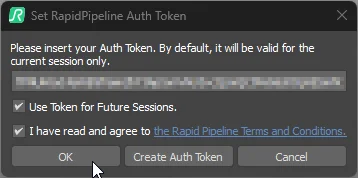
- Open the integration host application, invoke the RapidPipeline plugin, and click on the License Key button at the top of the interface.

- Paste in the Token string, enable the checkbox "Use Token for Future Sessions", enable the checkbox "I have read and agree...", then click on OK or Save.
Desktop Seat Management
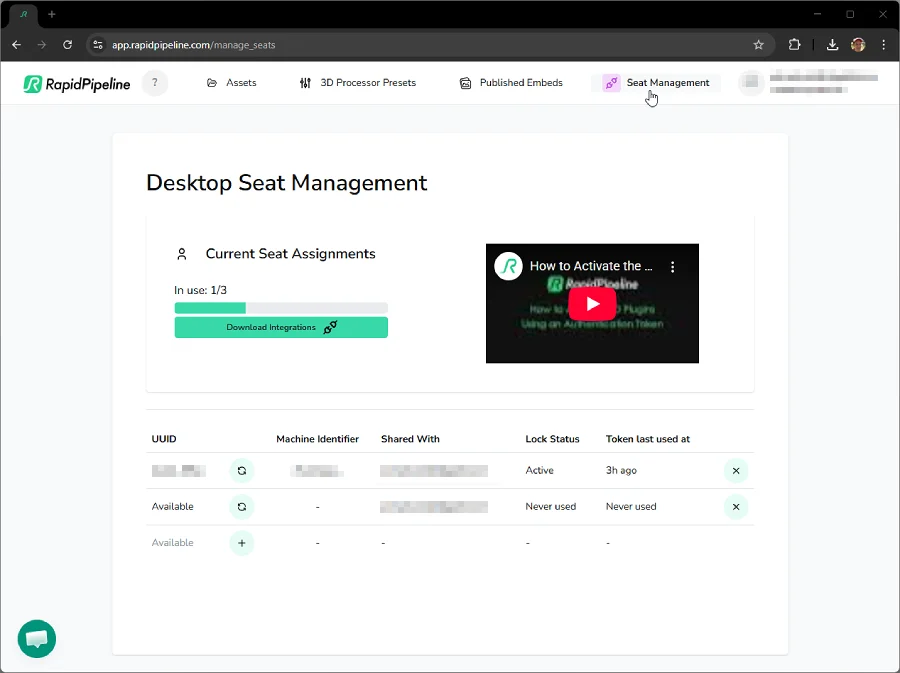
This page allows all Tokens to be managed for the account. You can always check the status of your Tokens and see if they are in recent use or not, by visiting the API Authentication Tokens and Desktop Seat Management pages in your dashboard.
Current Seat Assignments
Indicates how many seats are currently in use, out of the total number of seats allowed per your license terms.
UUID
The unique ID for each activated Seat. This is an identifier distinct from the Integration Token itself.
Create Key and Share
 The Create button can be used to generate a new Token string. This will invoke a popup dialog to create the Token.

By default, the e-mail address is populated with the e-mail of the current user, but this can be replaced before creating a Token. An e-mail address is required to generate a Token.
Press the Create Token button to generate a new Token.
Press the Copy button to copy the Token to the clipboard, or click Share via e-mail to send the Token to the provided e-mail address.
Refresh and Share
 The Refresh button can be used to replace an existing slot with a new Token string. This will invoke a popup dialog to replace the Token.
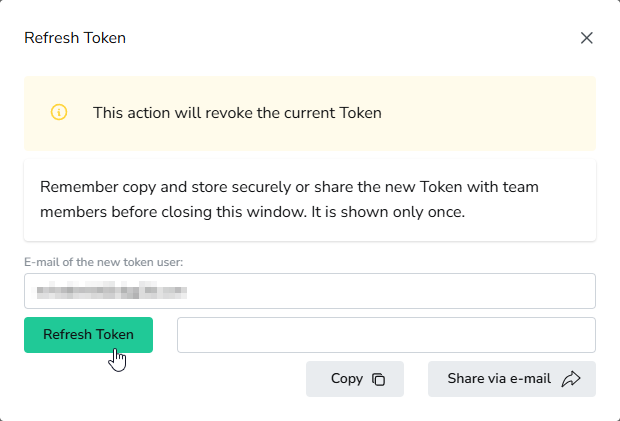
By default, the e-mail address is populated with the e-mail of the current user, but this can be replaced before refreshing the Token. An e-mail address is required to generate a Token.
Press the Refresh Token button to revoke the existing Token and generate a new one.
Press the Copy button to copy the Token to the clipboard, or click Share via e-mail to send the Token to the provided e-mail address.
Machine Identifier
The unique ID for each computer using an Integration Token.
Shared With
The e-mail address which was entered in the Create Token or Refresh Token popup window.
Lock Status
This indicates whether a Seat is in use, or has never been used.
Token Last Used At
This indicates the last time each Seat was used. Whenever a RapidPipeline Integration is launched within the host application, the Token will ping the RapidPipeline Licensing Server.
However this can vary depending on the license type. Offline licensing pings do usually not coincide with the last offline usage of the given seat.
Revoke Token
 The Revoke button can be used to delete a Token.
If you decide to revoke a Token, keep in mind that revocation is terminal; you will not be able to recover the same exact Token that was revoked. However, revoking a Token frees up a slot, so simply create a new Token instead, and insert it into the desired application.
You can manually release one seat every 24 hours to assign a different machine. Seats are automatically released after 2 weeks of inactivity.
After a seat is released, avoid processing or entering the respective token again on the machine which should not have the seat assigned anymore, as this will re-activate the seat again to the same machine and triggers the 24 hours seat release rate limit.
As an alternative you can re-issue a new token to generate a new seat for the new machine. In those cases we recommend to revoke the old token which should then not be in use anymore.
Multi-User
One account in your organization can be used to share multiple Tokens with different teams, departments or individual users. The main administration tools will be managable only from the account which created the Tokens in the first place.
This approach works well using the CLI, API and Integration distributions of RapidPipeline, but will not work if multiple users want to access the same web portal account and interface. There is currently no multi-tenant system for the web platform.
There is no limitation on the number of available API Tokens, however the number of Integration Tokens may be limited per your license terms.
Download Integration Packages
The Integrations Download page offers all current available RapidPipeline Integration packages for download.
Please note the OS specific naming of the packages (e.g. macOS) and the different tags of the installer packages depending on additional functionalities (e.g. CAD Edition). Some packages with additional functionalities such as CAD Edition might require a specific subscription tier or addon package. Learn more on the RapidPipeline Pricing Overview Page.
If you are an end-user of the plugins and do not have your own account, or you are an account manager and want to distribute the plugin packages to users, please refer to our Public Integrations Downloads page. Note that a valid Token from a RapidPipeline account is still required to activate the given integration and generate a seat.
See the respective Installation Guides for detailed setup information: